Solutions for IT teams
Your IT command center — projects, access, and compliance in one stack
Track projects and timesheets with UpLog, control access with enterprise RBAC, monitor activity with audit logs, manage documents with UpDocs, and connect everything through APIs. One platform for IT delivery and governance.
Permissions
235
Modules
49
IT stack
Seven pillars for delivery and governance
Projects, access control, audit trails, docs, APIs, and spend — with live product screenshots where it matters.
UpLog
Projects, tasks, timesheets, and screenshot-based time tracking
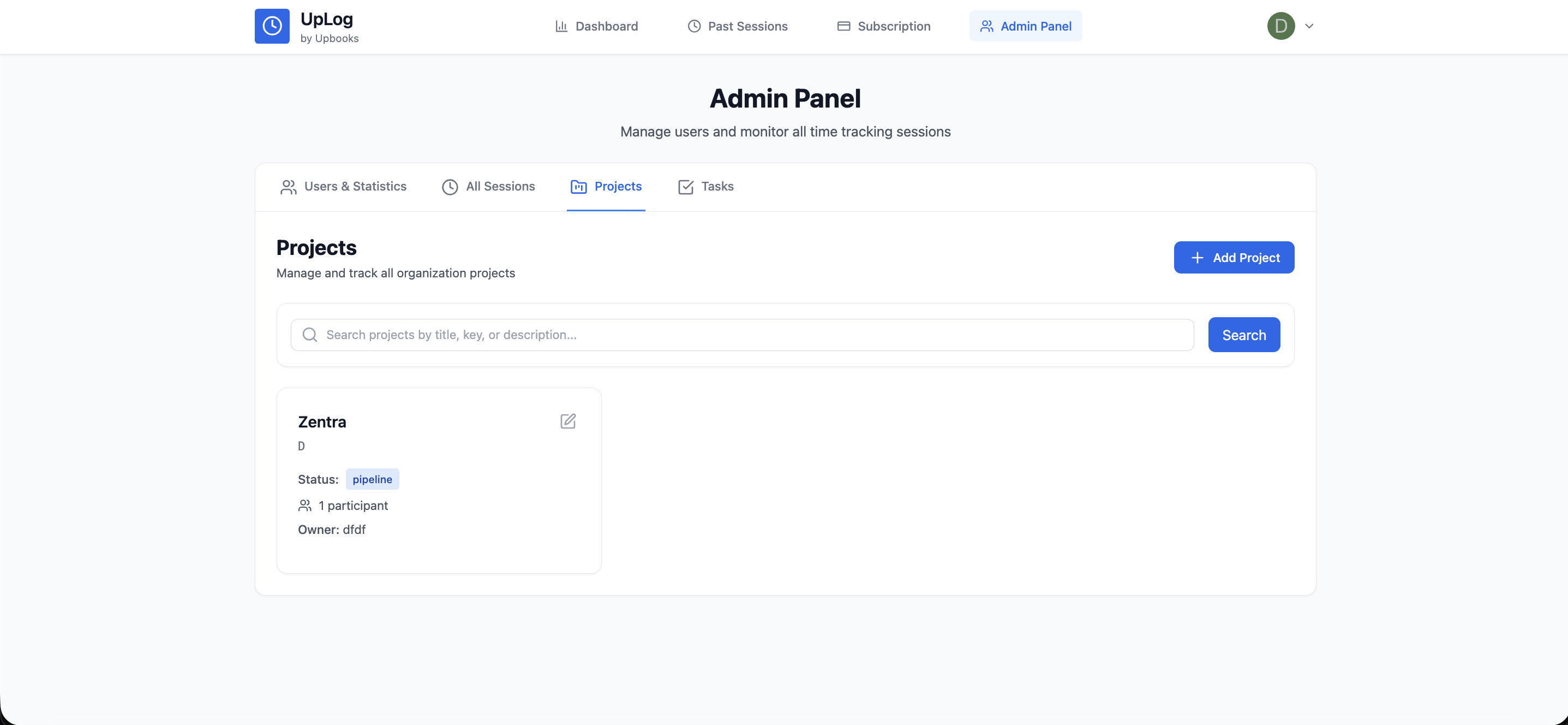
- Create and manage IT projects with budgets, timelines, team assignments, and status tracking
- Break projects into tasks with priorities, dependencies, assignees, and due dates
- Log timesheets against tasks and projects — track billable and non-billable hours separately
- Screenshot-based time tracking captures periodic screen grabs so remote and distributed teams stay accountable
- Daily statistics show hours logged, tasks completed, and productivity trends per team member
- Generate time reports by project, team, date range, or client — export for billing, audits, or stand-ups
- Works alongside Kanban boards and timeline views for full project visibility
IT teams juggle sprints, support tickets, and internal projects simultaneously. UpLog connects task execution to actual time spent — so capacity planning, client billing, and productivity reviews are driven by real data, not guesswork.
Custom Boards
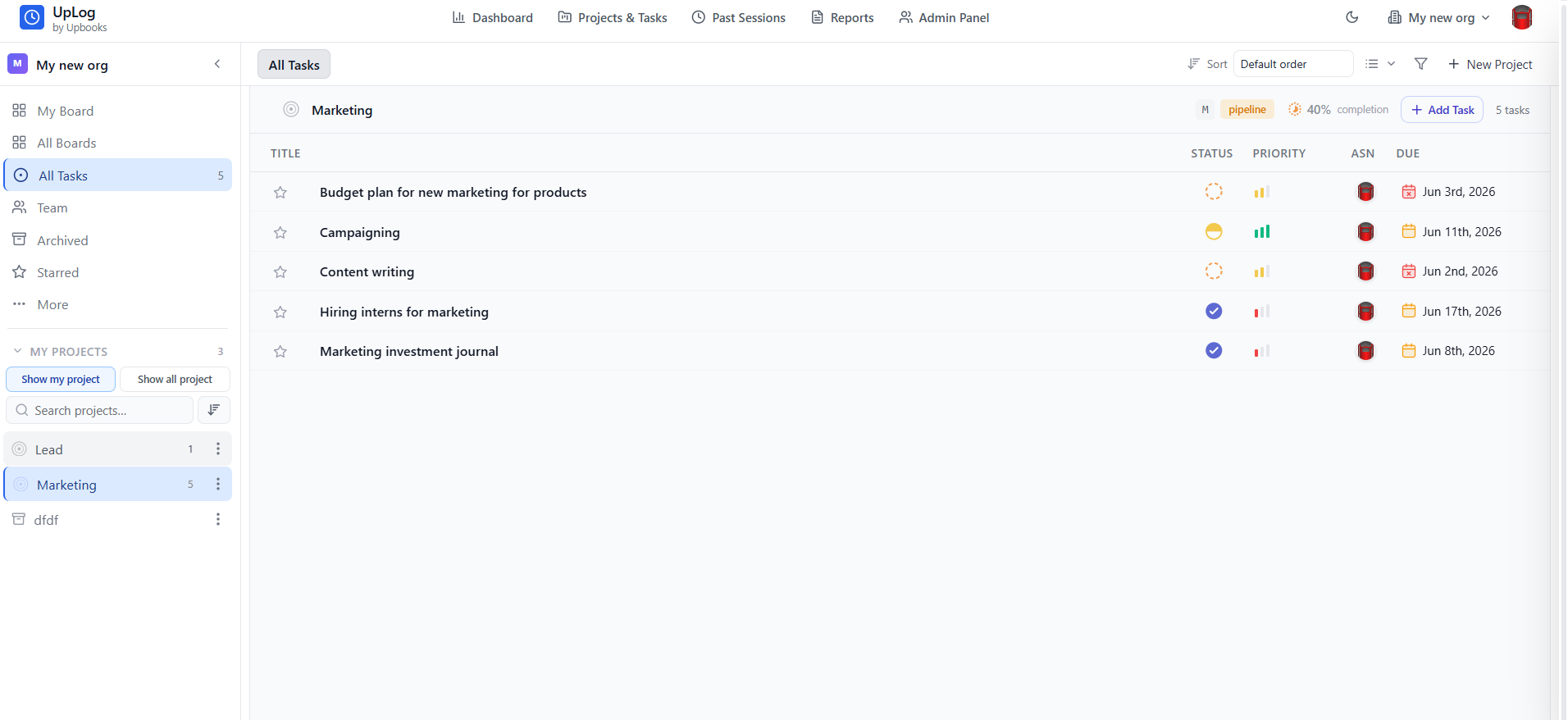
Kanban boards for sprints, incidents, change requests, and IT service delivery
- Create custom boards for any IT workflow — sprint planning, bug tracking, change requests, infrastructure rollouts
- Design board columns that match your process: Backlog → In Progress → Code Review → QA → Done
- Multiple boards per project — separate sprint board, backlog, and stakeholder tracker
- Drag and drop cards to update status without opening forms — perfect for daily stand-ups
- Add custom fields per board: severity, environment, affected system, deployment target
- Set task dependencies so blocked work is clearly visible across the team
- Import and export tasks via CSV for migration, bulk updates, or external reporting
- Timeline (Gantt) view for infrastructure rollouts and multi-sprint planning
IT work isn't one-size-fits-all. Sprint boards, incident trackers, and infra rollout checklists each need different columns, fields, and workflows. Custom boards let you configure each one without duct-taping multiple tools together.
Access Control
235 permissions. 49 modules. 19 predefined roles. Full enterprise RBAC.
- Enterprise-grade role-based access control with 235 granular permissions across 49 modules
- 19 predefined roles out of the box — from Admin and Finance Manager to Viewer and Custom roles
- Create custom roles with exact permission combinations for your org structure
- Control access at the module level: who can view, create, edit, delete, approve, or export in each area
- Enforce least-privilege access so developers don't see payroll and HR doesn't touch production configs
- Changes to roles and permissions are logged in the audit trail for compliance reviews
- JWT-based architecture ensures permissions are enforced server-side, not just in the UI
Why it matters
IT teams are the gatekeepers of organizational data. Enterprise RBAC means you configure access once, enforce it everywhere, and prove compliance to auditors — without maintaining spreadsheets of who has access to what.
Enterprise RBAC
liveIT Admin
49 modules
235
permissions
Developer
22 modules
84
permissions
Viewer
18 modules
42
permissions
Auditor
12 modules
56
permissions
Audit & Compliance
Every action logged. Every access tracked. Full audit trail.
- Comprehensive audit logs capture who did what, when, and from where — across every module
- Track user logins, data modifications, document access, and configuration changes
- Filter logs by user, module, action type, or date range for targeted investigations
- Access logging monitors which users viewed sensitive data — critical for SOC 2, ISO 27001, and GDPR readiness
- Activity monitoring surfaces productivity patterns and flags anomalies for security review
- Export audit trails for external auditors, compliance reviews, or incident investigations
- Period locks prevent retroactive changes to closed financial periods — enforced system-wide
Why it matters
When the auditor asks "who changed this record on March 15?", you need an answer in seconds, not hours. Audit logs and activity monitoring give IT the visibility to maintain security posture and satisfy compliance requirements.
Access Control → Updated RBAC role
Finance → Viewed vendor ledger
UpLog → Exported project report
Auth → Login successful
Activity — last 24h
UpDocs
Centralized document repository with version control and access rules
- Store SOPs, runbooks, vendor contracts, and IT policies in one secure, searchable repository
- Organize documents by project, department, client, or custom categories
- Attach documents to tasks, projects, invoices, vendors, or any record in the system
- Control who can view, download, or edit each document using RBAC permissions
- Version history tracks every revision so you never lose a previous draft
- Upload from any module — procurement, HR, finance, projects — and find everything in one place
Why it matters
IT teams create and consume more documents than any other department — from architecture diagrams to vendor NDAs. UpDocs keeps everything findable, version-controlled, and access-restricted without a separate document management subscription.
Version history
v3.0
v3.1
v3.2
currentAPI & Integrations
RESTful APIs, webhooks, and sandbox environments for safe testing
- Full REST API access to build custom integrations, dashboards, and automation workflows
- API keys managed per team with scoped permissions — control what each integration can access
- Sandbox environments for testing integrations, migrations, and configurations without touching production data
- Connect Upbooks to your existing stack — CI/CD pipelines, monitoring tools, helpdesk, or BI platforms
- Webhook support for real-time event notifications across systems
- API documentation with endpoint references, authentication guides, and example payloads
Why it matters
IT teams don't want another silo. API access and sandbox environments mean you can integrate Upbooks into your existing infrastructure, test safely, and automate without risk.
REST API & webhooks
live# List projects — sandbox environment
curl -X GET https://api.upbooks.io/v1/projects \
-H "Authorization: Bearer ub_sandbox_••••"
{ "data": [{ "id": "proj_8f2a", "name": "Infra rollout" }], "meta": { "page": 1 } }
IT Expense Tracking
Track software licenses, cloud bills, hardware purchases, and vendor payments
- Log IT-specific expenses — SaaS subscriptions, cloud infrastructure, hardware, consulting fees
- Each expense gets a unique reference, branch, category, and approval status
- Attach receipts, invoices, and POs to expense records for complete audit trails
- Multi-currency support for international vendor payments and SaaS billing
- Track status from draft → submitted → approved → paid with full visibility
- Filter and report by vendor, category, branch, or period to understand where IT budget goes
Why it matters
IT budgets are under constant scrutiny. Tracking every license, cloud bill, and vendor payment in one system means you always know where the money went — and can justify the next budget request with real data.
IT spend — Q2 2025
$112.5K
Total
$112K
Approval pipeline
Recent vendors
AWS
Cloud
$18,420
PaidAtlassian
SaaS
$4,200
ApprovedDell
Hardware
$6,800
SubmittedGive your IT team one platform for delivery and governance
- UpLog for projects, tasks, and time tracking
- Enterprise RBAC with 235 permissions
- Full audit logs and activity monitoring
- UpDocs for centralized documentation
- API access and sandbox environments