Every site, contract, and cost — tracked from foundation to handover
Manage projects and timesheets with UpLog, track contracts and progress billing, control vendor and material costs with procurement, log expenses per site, and close books with project-level profitability.
Site blueprint
Riverside Tower · Block A
Live build
Floor 5 / 8
Job margin
14.2%
Contract
₹2.4Cr
Billed
46%
Labour
284h
POs open
7
Construction stack
Seven capabilities. One site-to-books platform.
Projects, contracts, procurement, expenses, billing, job costing, and documents — with live product screenshots and flow visuals throughout.
Site to books
Phases on the board. Margins on the ledger.
Track every construction phase on custom boards while contract value, labour hours, and material costs roll into live job costing — no spreadsheet handoffs.
Phase boards
Foundation → Structure → MEP → Finishing
Phase board · Site A
liveFoundation
Structure
MEP
Finishing
Job costing
Contract → Billed → Costs → Margin
Job costing · Riverside Tower
liveProjects, Boards & Timeline
One project per site — phases, tasks, and milestones in view
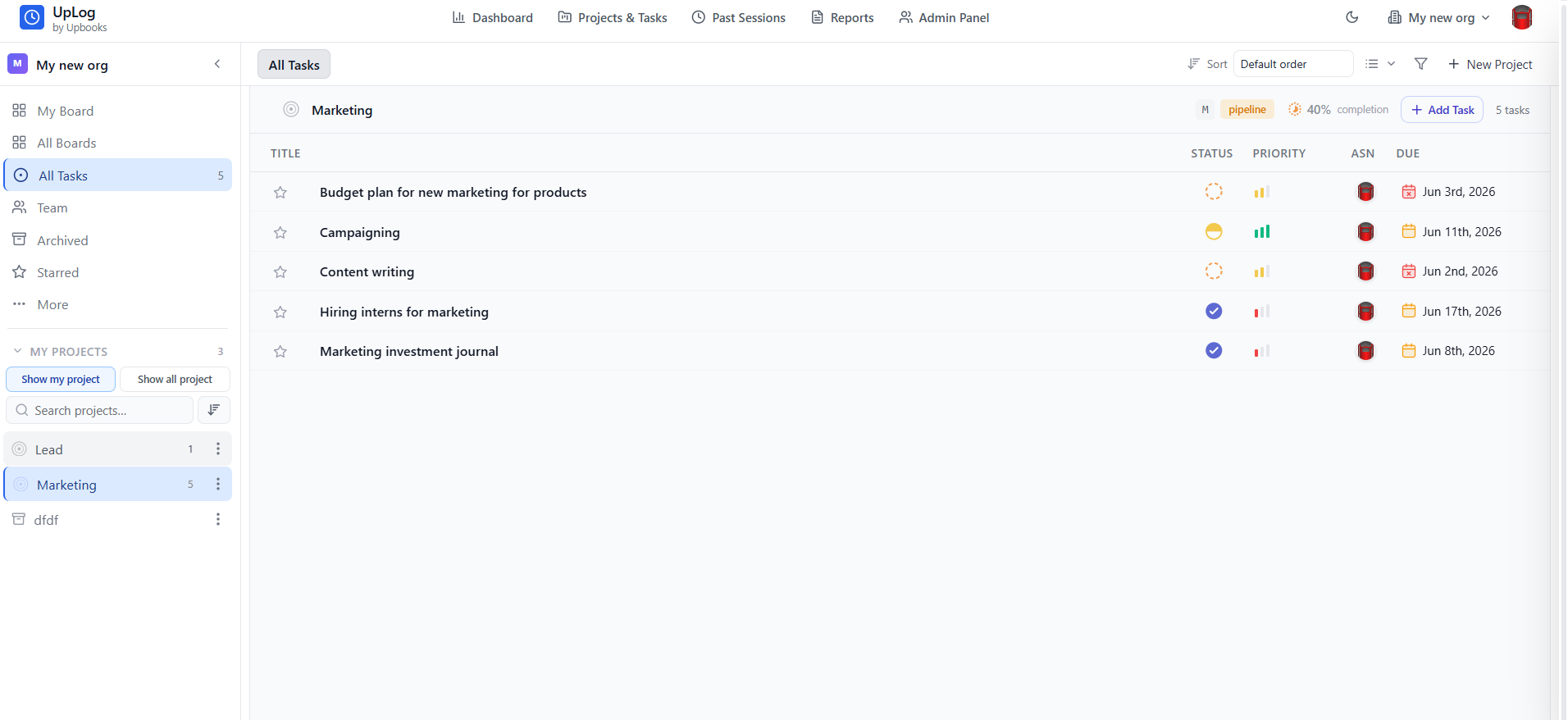
- Create a project per site or job with budget, timeline, team, and client
- Break each job into tasks with assignees, due dates, priorities, and dependencies
- Custom boards per project: phases (Foundation → Structure → MEP → Finishing), punch lists, handover checklists
- Timeline (Gantt) view for multi-phase scheduling and milestone visibility
- Track estimated vs. actual budget and dates — spot overruns early
- Multiple boards per project: separate phase tracker, sub-contractor board, and stakeholder view
Construction projects run months or years across many teams. Boards and timeline keep every phase, task, and dependency visible without switching tools.
Contracts Management
Main contracts, subcontracts, and billing limits in one place
- Store main contracts and subcontracts with party, dates, value, and terms
- Link invoices to contracts — see total billed vs. contract value at a glance
- Attach signed documents and amendments to each contract record
- Track renewal and expiry dates with automated reminders
- Supports tenders and audits: clear trail from agreement to billing
Why it matters
Construction lives on contracts. When invoices are linked to contract value, you never overbill or underbill — and auditors see a clean trail.
Agreement → Milestone → Billing
Renewal · 18dMain contract
Apex Developers
Milestone
Structure phase
Progress invoice
₹84L billed
Contract limit
₹1.10 Cr total
Subcontracts linked
Steel & structure
₹48L
MEP subcontract
₹32L
Clean trail: contract → milestone → invoice → ledger
Vendors, Purchase Orders & Material Costs
PO → Receipt → Bill — pay only for what arrived
- Vendor profiles with contact, tax, payment terms, and purchase history
- Purchase orders for materials, equipment, and subcontractor services
- Track PO status: Draft → Sent → Partially Received → Fully Received → Billed
- Item receipts confirm received quantities and update inventory per site
- Vendor bills with three-way matching: PO → Receipt → Bill
- Debit notes for returns or short shipments
Why it matters
Materials and subs eat margins if untracked. PO → Receipt → Bill flow ensures you only pay for what arrived and what was agreed.
PO → Receipt → Bill
Three-way matchPurchase Order
PO-882 · Steel rebar
₹4.2LItem Receipt
Site B · 48 of 50 MT
GRN-219Vendor Bill
3-way matched
₹4.0LPayment
Outward · NEFT
PaidMatching check
PO qty
50 MT
✓ alignedReceived
48 MT
✓ alignedBilled
48 MT
✓ alignedPay only for what arrived — short shipment flagged for debit note
Expense Management — Per Site, Per Phase
Capture every site spend with approvals and audit trails
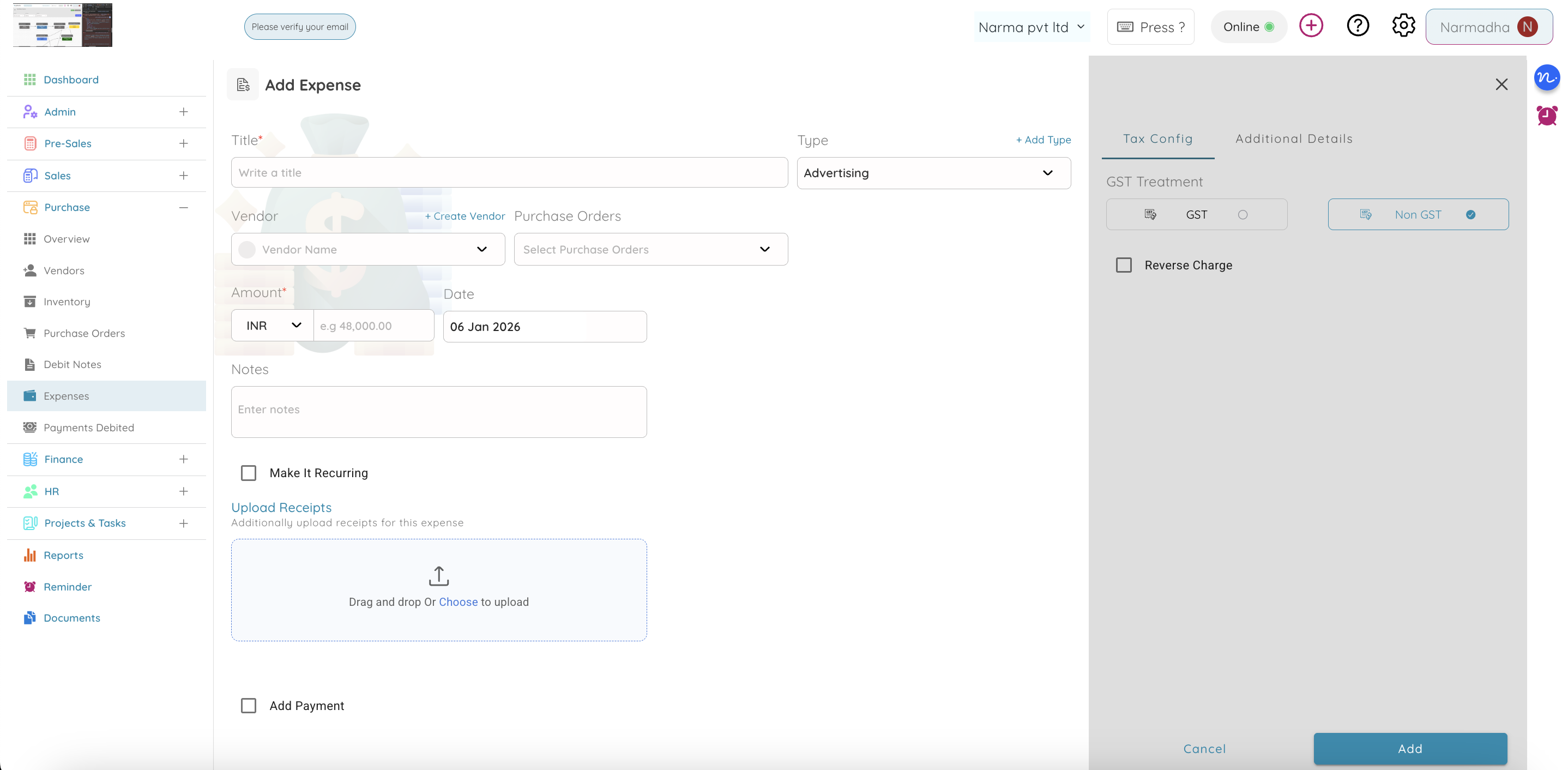
- Log site expenses with project, branch, category, and purpose
- Attach receipts and supporting documents for audit trails
- Approval workflow: Draft → Submitted → Approved → Paid
- Filter expenses by project, phase, or vendor to see cost breakdown per job
- Expenses post to the general ledger — project-level P&L stays current
Construction spend is scattered: fuel, permits, equipment hire, consumables. Capturing every expense per site keeps margins visible and surprises rare.
Invoicing & Progress Billing
Milestone billing linked to contracts and projects
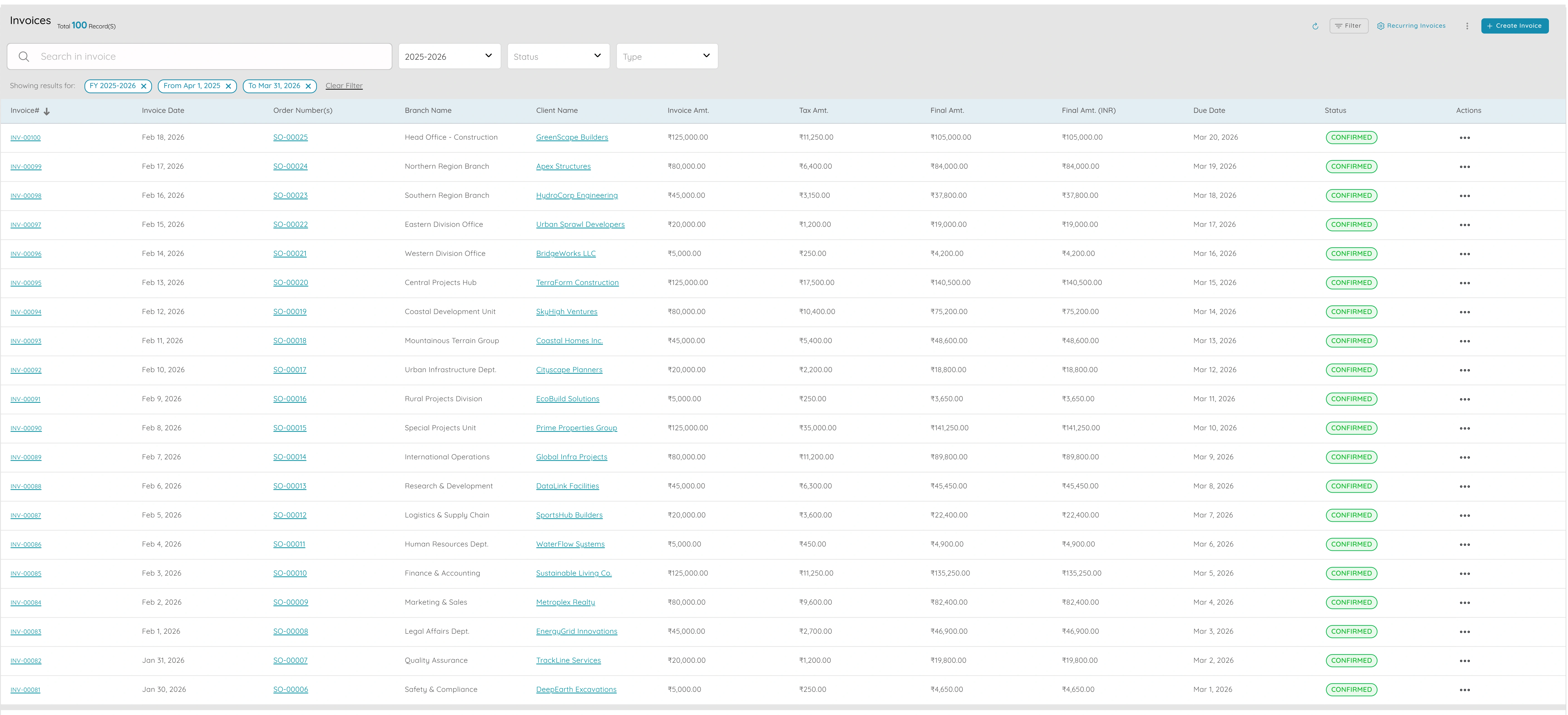
- Bill by project or phase — link invoices to projects for profitability tracking
- Progress billing: invoice a percentage of contract value as milestones are hit
- GST-compliant invoices with correct tax calculated automatically
- Record payments per client and project — see outstanding and overdue at a glance
- Credit notes and debit notes linked to original invoices
Construction billing is milestone-driven. Linking invoices to contracts and projects means you bill accurately, collect faster, and see profit per job.
Finance & Job Costing
Live project P&L from the same ledger as operations
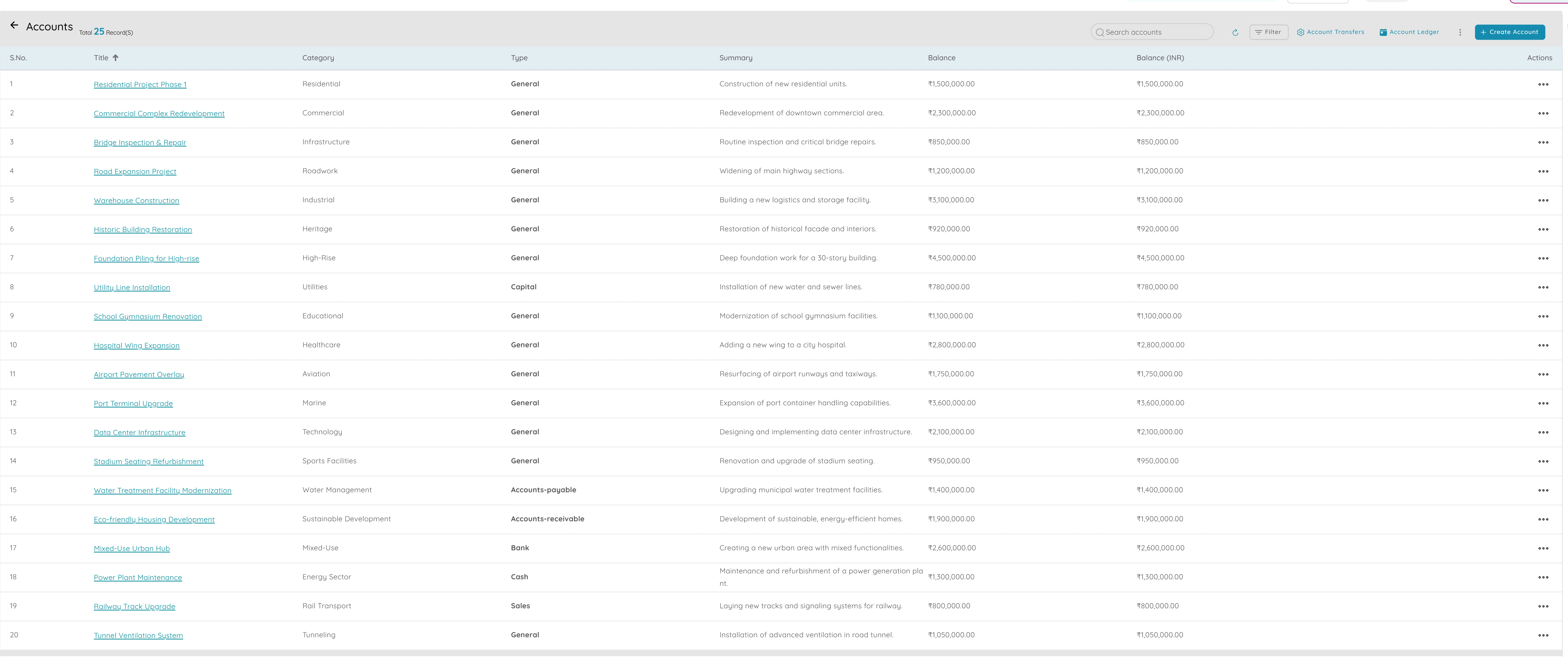
- Chart of accounts and general ledger connected to projects, vendors, and payroll
- Project-level P&L: revenue, material costs, labour, expenses — margin per job
- Bank reconciliation to match site payments and client receipts
- Period locks prevent retroactive changes to closed months
- Tax compliance: GST/VAT reports from posted entries
Knowing whether a job made money shouldn't wait until it's finished. Live job costing from the same ledger means you course-correct while the project is still running.
Document Management
Contracts, drawings, permits — searchable and access-controlled
- Store contracts, drawings, permits, and certifications per project
- Attach documents to tasks, vendors, invoices, and expenses
- Access-controlled: control who can view or download sensitive project files
- Version history ensures the latest document is always findable
Why it matters
Construction generates stacks of paperwork. Centralised, access-controlled documents mean the right file is always one search away.
Project documents
liveMain contract.pdf
Contract · Site A
Floor plans v3.dwg
Drawing · Site A
Subcontractor agreement.pdf
Contract · Site B
Safety spec.docx
Specification · Site B
Run every site from one platform
- Projects, boards, and timeline per site
- Contracts linked to progress billing
- Procurement with three-way matching
- Per-site expenses and approvals
- Live job costing and project P&L